Quick Answer
Every standard credit card, debit card, or driver's license built to ISO/IEC 7810 ID-1 measures exactly 85.60 mm × 53.98 mm (3.370 × 2.125 inches). Hold one flat against the Calibration Guide slider and drag until the frame matches the card's left and right edges—taking under 10 seconds.
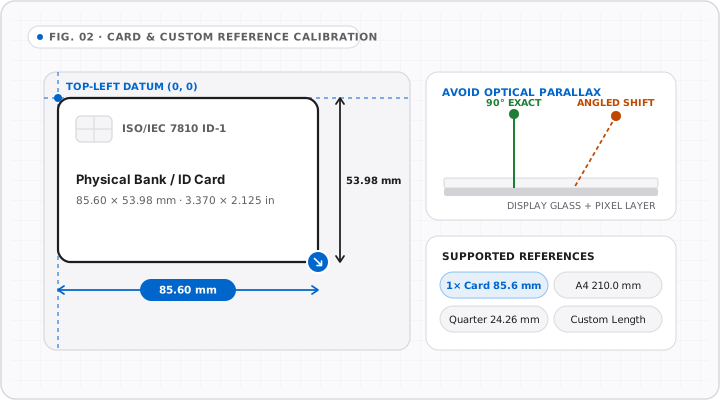
Every time an online ruler looks suspiciously big or tiny on a laptop or phone, a 10-second credit card calibration fixes it completely. Because bank cards are stamped to international micrometer tolerances, your wallet holds a sharper calibration gauge than most cheap desk rulers.
Exact Dimensions of an ISO/IEC 7810 ID-1 Card
Whether you pull out a US Visa, UK contactless debit card, Canadian Interac card, or Australian Medicare/EFTPOS card, all ISO ID-1 cards measure:
- Width:
85.60 mm(8.56 cm/3.370 inches) - Height:
53.98 mm(5.398 cm/2.125 inches) - Corner Radius:
2.88–3.48 mm(always align the flat straight middle edges, never the rounded corners!)
Step-by-Step Calibration on OnlineRulerPlus
- Set your browser zoom to
100%first (Ctrl+0on Windows/Linux orCmd+0on macOS). - Open the OnlineRulerPlus Calibration Guide (or tap Calibrate directly in the main ruler toolbar on
/). - Hold your card’s horizontal flat top edge lightly against the calibration box on screen, aligning the left straight side with
0. - Drag the calibration slider until the right edge aligns cleanly with the right straight edge of your card (
85.60 mm), then save. - Double-check: Place a regional coin (such as a US Quarter at
24.26 mmor Australian $1 coin at25.00 mm) against the main Online Ruler0–3 cmmarks to verify.
When Should You Recalibrate?
Your calibration persists locally in your browser across /, /inch-ruler, /cm-ruler, /mm-ruler, and /quadrant, so you normally do this once per device. Recalibrate only when:
- Dragging your browser window onto a different external monitor with a different DPI.
- Changing Windows Display Scale (
100% ↔ 125% ↔ 150%) or macOS Scaled Resolution. - Changing browser zoom (
Ctrl +/Cmd +).
Learn the exact mechanics of OS scaling and dual-monitor drift in Windows & macOS Display Scaling: Why Your Screen Ruler Changes Size.
Interactive Tools on OnlineRulerPlus
Try It in the Calibrated Workspace
Questions & Answers
Frequently Asked Questions
Do US, UK, Canadian, and Australian credit cards all share the exact 85.60 mm size?
+
Yes. Payment networks (Visa, Mastercard, American Express), bank debit cards, Opal/Oyster transit cards, and modern plastic driver's licenses across the US, UK, Canada, and Australia conform to the ISO/IEC 7810 ID-1 global specification: 85.60 mm wide by 53.98 mm tall (3.370 × 2.125 inches).
Do I have to recalibrate every time I switch from inches to cm or mm?
+
No. OnlineRulerPlus stores your calibrated CSS pixels-per-inch factor locally in your browser. Calibrating once automatically updates the main dual ruler, Inch Ruler, CM Ruler, MM Ruler, and XY Guides until you clear browser data or change monitor scaling.
What if I do not want to press a card onto my screen?
+
Wrap a clean sticky note or microfiber corner behind the card, align using a soft-edge transit card, or use the monitor diagonal + resolution mode in our Calibration Guide (though card alignment eliminates Windows/macOS scaling guesswork).
Standards & Verified Sources
- ISO/IEC 7810 — Identification cards: Physical characteristics — Global ID-1 card standard defining 85.60 mm × 53.98 mm dimensions.
- OnlineRulerPlus Calibration Guide — Interactive credit card and monitor diagonal calibration interface.