1Local Privacy · Ctrl+V Paste
Upload a Photo or Paste a Screenshot
Click Open Photo Mode or press Ctrl+V anywhere in the workspace to load PNG, JPEG, or WebP images straight from memory without uploading files to a remote server.
Drop an image or press Ctrl+V, mark any known reference length (credit card, coin, or A4 sheet), and measure spans, bounding boxes, and angles privately in your browser.
Origin (0, 0) · Top-Left Dashed Datum
Align your object with the 0 tick mark. Click any ruler or grid to drop draggable measurement guides.
100% Client-Side Photo & Clipboard Ruler
Press Ctrl+V to paste a screenshot, drop an image here, or choose a file. Nothing is ever uploaded.
Display Density Calibration · Saved Locally Per Screen
Browsers default to 96 CSS pixels per inch, which rarely matches physical display panels. Choose one of the three calibration methods below so every millimeter and fractional inch tick corresponds to actual physical length.
96.0 PPI·3.780 px/mm
CSS reference scale (96 px per inch)
Hold any standard payment card, driver’s license, or national ID card flat against the outline below and match its physical width.
Place Physical Card Here
Align left & top edges · Match outer border
Optical Alignment Checklist
Computed Scale: 96.0 CSS PPI · 3.780 px/mm
Keyboard fine-tuning: click the card stage and press ← → (Shift for 5px steps).
Enter the diagonal measurement of your visible screen panel in inches (corner to corner inside the bezel, not the outer laptop chassis). Ensure browser page zoom is at 100%.
Accuracy notes for diagonal calibration:
Online Ruler Plus inspects your browser’s reported logical screen dimensions, device pixel ratio, orientation, and platform to match known hardware profiles or compute a sensible initial estimate.
Why verify manually? Web browsers do not expose physical monitor sizes over HDMI/DisplayPort or custom OS scaling factors. Always verify with a physical card or known diagonal before critical measurements.
Physical Verification Gauge
Hold a real coin against these live-scaled reference outlines to confirm your calibration immediately.
Local Session Log
Place two parallel guide lines in the ruler workspace and click Save to History to record point-to-point spans (ΔX / ΔY) locally on your device.
Private Browser Image Metrology · Zero Server Upload
Turn floor plans, hardware photos, microscopy snaps, and UI screenshots into scaled measurements locally on your device.
Click Open Photo Mode or press Ctrl+V anywhere in the workspace to load PNG, JPEG, or WebP images straight from memory without uploading files to a remote server.
Pick two points spanning a known object in the photo (for example 85.60 mm across a bank card or 25.0 mm along a ruler tick) and enter its real length to lock in photo px/mm.
Drop parallel guides, inspect bounding-box width × height in cm/mm/in/px, adjust image opacity, and save an annotated PNG with embedded measurements.
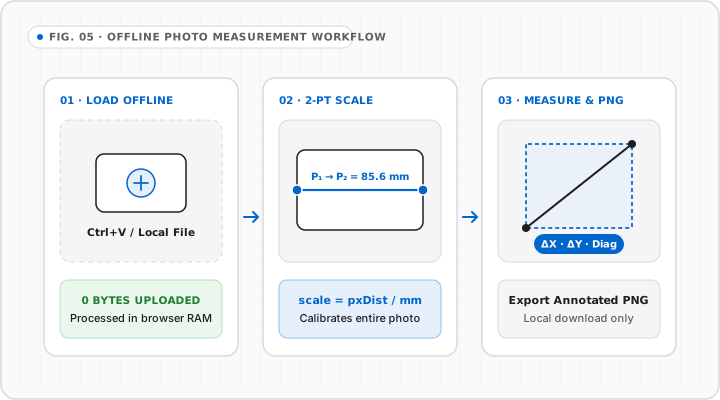
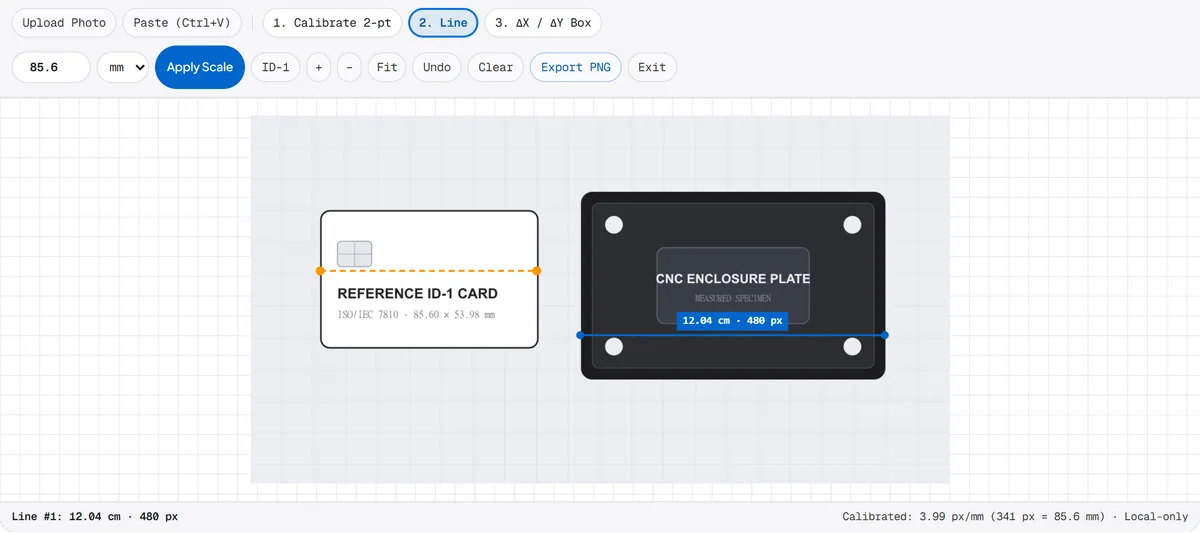
Photo Calibration References · Common Benchmarks
Including one rigid flat reference next to your subject compensates for camera distance and lens zoom in any smartphone photo.
Hold the smartphone camera directly perpendicular above both the reference card and the target object on the same flat table plane.
Screenshots pasted with Ctrl+V retain exact pixel dimensions, making UI mockups, CAD exports, and PDF clippings effortless to measure.
Images are decoded via URL.createObjectURL inside browser RAM and discarded automatically when you clear or close the tab.
| Reference Object | Exact Length (mm) | Inches (in) | Best Use Case |
|---|---|---|---|
| ISO ID-1 Bank / Credit Card Width | 85.60 mm | 3.370 in | Tabletop parts & crafts |
| ISO ID-1 Bank / Credit Card Height | 53.98 mm | 2.125 in | Compact vertical spacing |
| US Quarter Coin Diameter | 24.26 mm | 0.955 in | Coins, rings & small PCB boards |
| US Penny Coin Diameter | 19.05 mm | 0.750 in | Macro close-up fasteners |
| 1 Euro Coin Diameter | 23.25 mm | 0.915 in | European macro tabletop parts |
| AA Battery Length (IEC R6) | 50.50 mm | 1.988 in | Workshop & tool photos |
| US Letter Sheet Short Edge | 215.90 mm | 8.500 in | Furniture & floor mats |
| ISO A4 Sheet Short Edge | 210.00 mm | 8.268 in | Architectural sketches & parcels |
Place reference object flat beside target at equal camera distance to keep foreshortening below 1%.
Switch Ruler Axis or Unit Scale
Metric · cm
1 cm & 0.5 cm scale + cm-to-inch chart
Imperial · 1/16″
1/2, 1/4, 1/8, 1/16″ fractions
Fine Pitch · mm
1 mm & 5 mm hardware scale
Top & Bottom
Wide spans & CSS pixel (px) scale
Left & Right
Upright height & mobile portrait
Related Editorial Guides
Deep-dive walkthroughs and conversion charts for this ruler mode.
Photo Measurement FAQ
No. Image decoding, zoom/opacity controls, reference line math, and annotated PNG canvas export all execute locally inside your browser tab.
On flat overhead photos with the reference object in the same focus plane, errors are typically within 1–2 pixels across the span. Lens barrel distortion or angled shots reduce accuracy toward corners.
Yes. Toggle Bounding Boxes or ΔX/ΔY guides to read simultaneous horizontal and vertical dimensions in CSS pixels, mm, cm, or fractional inches.
Standard browser image formats including PNG, JPEG, WebP, GIF, and SVG files, plus direct clipboard bitmap screenshots via Ctrl+V or Cmd+V.