Quick Answer
Unlike linear screen rulers, angle measurements stay identical on any monitor or display scaling because degrees depend on slope ratio, not physical PPI. Open OnlineRulerPlus Protractor, drag the vertex to the corner of your shape or pasted screenshot, align both arms along the two edges, and read the exact interior and supplementary degrees.
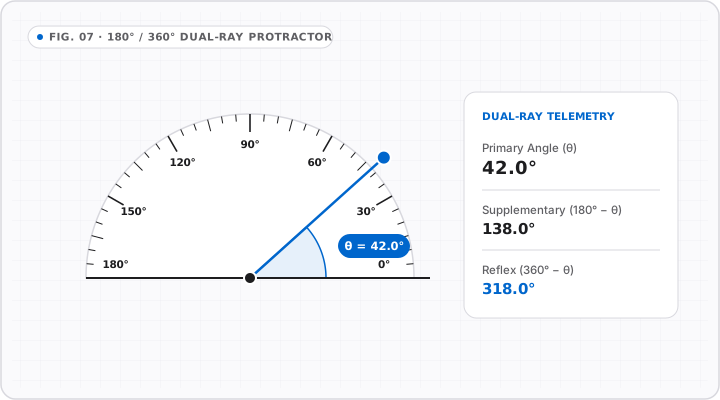
While measuring linear inches or millimeters on screen requires calibrating display PPI, measuring degrees has a built-in geometric superpower: angles do not change when you zoom in or change monitor size. A 30° corner stays 30° whether displayed on a 6-inch phone or a 32-inch 4K screen.
Open the Online Protractor right alongside this guide to test each step.
Three Steps to Measure Any Angle on Screen or in a Photo
- Load your reference (optional): Paste a screenshot (
Ctrl+V/Cmd+V), drop a PDF snapshot or image into Online Protractor, or align directly over an open window/drawing. - Pin the vertex cleanly: Drag the center pivot onto the exact point where the two lines meet.
- Align both arms (
Ray AandRay B): Pull the baseline arm along one straight edge as far out from the vertex as visible—longer arms minimize 1-pixel angular jitter—then drag the second arm onto the opposite edge.
Reading Interior, Supplementary, and Miter Cuts
Every vertex produces useful paired readings:
| Angle Type | Formula | Practical Example | Common Use |
|---|---|---|---|
Acute / Interior (θ) |
Direct arm delta (< 90°) |
35° |
Geometry homework, drafting, roof triangles |
Obtuse (θ) |
90° < θ < 180° |
135° |
Bay window trim, hexagonal frames (120°) |
Supplementary (180° - θ) |
Opposite straight-line complement | 45° supplement to 135° |
Crown molding & outside corner checks |
| Saw Miter Setting | (180° - Corner°) ÷ 2 (or 90° - θ/2) |
94° drywall corner -> 47° half-angle (43° miter) |
Framing odd corners neatly |
Three Precision Tricks for Digital Protractor Measurements
- Extend arms along the longest clean line: Moving an arm endpoint 200 pixels from the vertex cuts angular wobble by 4× compared to stopping 50 pixels away.
- Correct camera tilt first on real-world photos: Shooting a staircase stringer or countertop corner diagonally distorts
90°corners into82°or98°. Always hold your lens perpendicular to the surface when snapping an angle photo. - Verify true horizontal/vertical baselines with XY Quadrant Guides: Need to check if a scanned blueprint or artwork border is slightly crooked? Drop an XY baseline first to confirm
0°level.
Interactive Tools on OnlineRulerPlus
Try It in the Calibrated Workspace
Questions & Answers
Frequently Asked Questions
Do I need to calibrate my monitor before using an online protractor?
+
Not for angles! Degrees are purely proportional ratios (vertical rise over horizontal run). As long as your display renders square pixels—true on virtually all modern laptops, desktops, and phones—a 45° or 37.5° angle stays identical at 100%, 125%, or 200% zoom.
Can I measure an angle from a photograph or screenshot using OnlineRulerPlus?
+
Yes. Inside our Online Protractor, you can paste a screenshot directly (Ctrl+V / Cmd+V) or upload an image file, position the protractor vertex over the corner, and align the two arms along the edges to measure cleanly inside your browser.
What causes wrong angle readings when measuring from photos of stairs or roofs?
+
Perspective tilt. Just like photo length measurements, photographing a corner from the side foreshortens one edge and shifts the apparent angle. Shoot straight facing the corner plane whenever measuring real carpentry or roof angles from photos.
Standards & Verified Sources
- NIST — Plane Angle (Radian & Degree Definitions) — Full circle = 360 degrees (2π radians); scale-invariant geometric ratio.
- OnlineRulerPlus Protractor Tool — Interactive browser 360-degree protractor with local image paste support.